
Security & data
How SIP looks after your school's records
What we do to keep each school's records separate and safe, and what you can check for yourself.
Each school's records stay with that school
- Every request to SIP's servers is checked against the school of the person making it. Another school's admin, teacher, student or parent gets nothing back
- Admins, teachers, non-teaching staff, students and parents each see only what their role allows, and the server enforces it, not just the app's screens
- Extra responsibilities are given per person: the admin chooses which staff can manage fees, admissions, results or security, and a duty can grant one for the week it runs
- A parent sees a child only after the school confirms the link
- Students and parents see a report card only once the school publishes it
How records are stored
- Connections between the apps and SIP's servers use HTTPS
- Passwords are stored as salted hashes, never as the password itself
- Repeated wrong passwords and reset codes are slowed down and then refused
- On the desktop, sensitive fields (such as guardians, health notes and staff bank details) are stored encrypted on the computer
- Card payments go through Paystack's own checkout. Card numbers never reach SIP
- Voice capture on the desktop is turned into text on the computer itself; the recording isn't sent anywhere
Backups
- Records entered on a desktop are sent to SIP's servers, so a lost or broken computer doesn't lose them
- Each computer also keeps a daily encrypted backup of its own copy
- You can save a backup file anywhere, protected by a passphrase you choose. We can't open it, and we can't recover a forgotten passphrase
- Restoring a backup first makes a safety copy of what's there
Accountability Ledger
A record of who changed what
On every plan. Read by the admin and staff given permission.
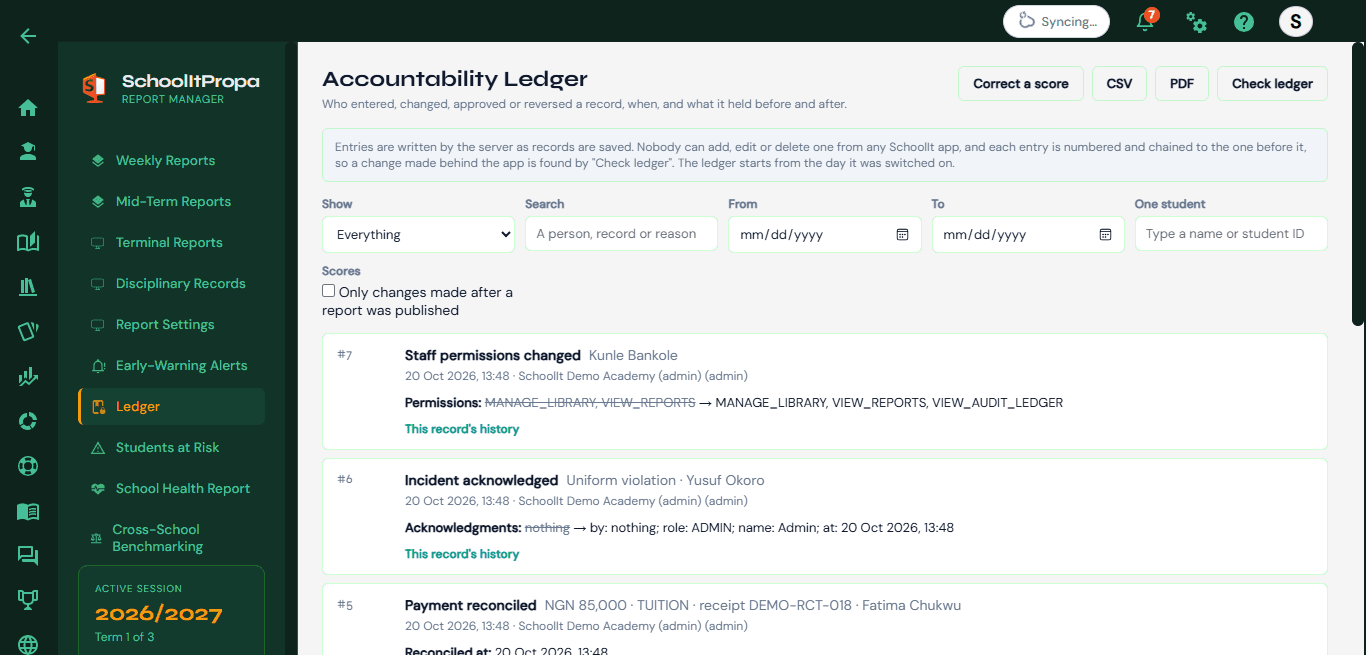
- Who entered, changed, approved or reversed a score, payment, report, attendance mark or permission, with the values before and after
- Entries are written by the server as records are saved. No SIP app can add, edit or delete one
- Each entry is numbered and linked to the one before it, so Check ledger finds an entry that was changed, removed or reordered
- Each week the school is emailed a short code for where its ledger stands, a copy held outside SIP
- It makes changes visible; it isn't proof against someone with direct access to the database who rebuilds the whole chain. We say so in the app too
Your records are yours
- Your school's records belong to your school
- Export them from the desktop as spreadsheet files at any time, on any plan
- If a subscription ends, nothing is deleted: the school keeps its plan for the period paid plus one more week, then moves to the Free plan, where Free-plan features keep working and paid screens are locked until you subscribe again
- AI features (exam generation, AI marking and the writing assistant) send the text they need to our AI provider. AI marks are never published without a teacher's review
Our Privacy Policy covers what we collect and why. Questions about security? Contact us.
Questions about your school's data?
We'll walk you through how SIP handles it, on a demo or by message.